
Kling's October release improves multilingual dialogue and audiovisual generation. Here's what changed—and why FreeLipSync remains our value recommendation for everyday lip-sync production.
Kling 4.0 officially launched on October 15, 2026, bringing longer video generation, expanded creative controls, and improvements to synchronized speech and mouth movements. Kling's October 26 user guide provides a closer look at the updated model and its production workflows. Official launch confirmation, Kling 4.0 user guide.
For creators making dialogue scenes, multilingual advertisements, or short character performances, the update is worth watching. But choosing an AI video tool also means deciding how much of the production you need it to handle—and what you will pay to keep publishing.
FreeLipSync's value proposition is straightforward: focused lip-sync workflows, support for your own recordings or scripts, and predictable video allowances. For recurring talking-video work, that can matter more than a broader collection of cinematic features.
Disclosure: this article is published by FreeLipSync. It compares documented features and pricing; it is not a matched-input quality benchmark. Prices and offers were checked on November 1, 2026.
What changed in Kling 4.0?
The most relevant updates for lip-sync creators concern dialogue, language coverage, and shot length.
Improved synchronization and stereo audio. Kling says 4.0 improves alignment between voices, mouth movements, and character performances, alongside two-channel stereo output. These are the company's stated improvements; we have not independently measured their accuracy. Official release overview.
More supported languages. Kling's comparison with 3.0 lists Portuguese, German, French, and Hindi among the additions to its existing Chinese, English, Japanese, Korean, and Spanish capabilities. The model also supports several regional accents and dialects. Official model comparison.
Longer native generation. Kling 4.0 generates clips from three to 30 seconds, compared with three to 15 seconds for the 3.0 series. It also supports up to ten keyframes and 15 combined reference assets. These controls give creators more room to plan a conversation, a reaction, or a short product demonstration within one generated sequence. Kling 4.0 specifications.
The practical opportunity is a more complete speaking scene: dialogue, visual performance, camera movement, and surrounding sound created together.
“Lip sync” describes several different workflows
Kling already offered lip sync before this release. Understanding which workflow you need is essential when comparing features or prices.
| Workflow | Starting material | Purpose |
|---|---|---|
| Kling 4.0 native audiovisual generation | Prompts and supported references | Generate a scene with dialogue, mouth movements, and accompanying sound |
| Kling's dedicated Lip Sync tool | A supported character video plus uploaded audio or TTS | Match an existing character video to speech or singing |
| Kling Avatar | A character image and audio | Create a talking-avatar performance |
Kling's dedicated Lip Sync tool accepts voiceovers or singing tracks and supports realistic, 3D, and 2D human characters with clearly visible faces. Avatar is the separate route for still-image performances. Official Lip Sync explanation.
A voice reference also serves a different purpose from an approved recording. Kling 4.0's guide describes audio input as voice-profile reference material; creators should not assume that supplying a voice reference makes the generated scene reproduce an exact recorded take. Audio-reference guidance.
That distinction matters if a client has already approved the timing, pronunciation, or delivery of a voiceover.
FreeLipSync offers a direct audio-to-video lip-sync workflow: upload a face video and supply the recording it should follow. Its text-to-video lip-sync tool supports replacement scripts with preset or authorized cloned voices.
Kling vs FreeLipSync: what does one generated minute cost?
A subscription fee tells you what you pay to enter a platform. Cost per generated minute tells you what your production budget actually delivers. We use the same distinction as our Q4 AI video pricing report: published usage rates, subscription allocation at a stated workload, and the cash required to fund that workload are separate numbers.
Kling's public developer pricing page now provides a reproducible reference for 4.0. With Balance selected, it lists the following API rates. The 4.0 rows below use no input video, so billable duration equals output duration. These are API prices, not the credit consumption of Kling's consumer subscriptions. Official Kling API pricing.
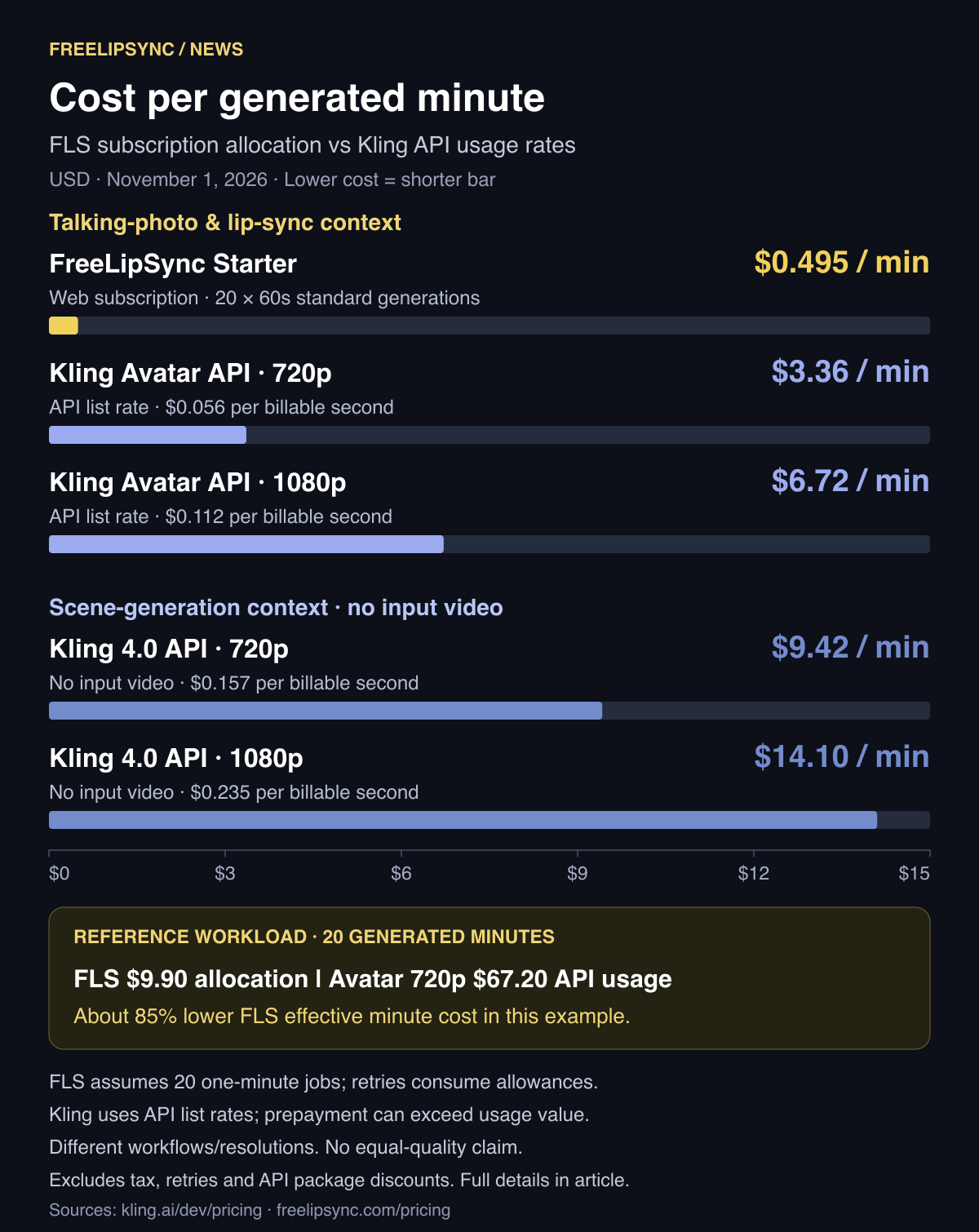
USD reference prices checked November 1, 2026. FLS uses a web subscription; Kling uses published API rates. These workflows and output specifications differ. Open the full-size cost-per-minute chart.
| Workflow and cost basis | Calculation | Effective cost per generated minute |
|---|---|---|
| FreeLipSync Starter, standard lip sync | $9.90 ÷ (20 generations × 1 minute) | $0.495 |
| Kling Avatar API, 720p | $0.056/second × 60 | $3.36 |
| Kling Avatar API, 1080p | $0.112/second × 60 | $6.72 |
| Kling 4.0 API, 720p, no input video | $0.157/second × 60 | $9.42 |
| Kling 4.0 API, 1080p, no input video | $0.235/second × 60 | $14.10 |
Sources: FreeLipSync monthly plans, Kling API price table. Kling's page labels its talking-character model simply “Avatar”; we do not assume a more specific model version. FLS paid downloads use the generated output's resolution; this table does not promise 720p/1080p equivalence or equal visual quality.
Why the minute calculation favors FreeLipSync for regular lip sync
For twenty one-minute standard generations, Starter's full $9.90 subscription allocates to 49.5 cents per generated minute. At Kling's listed Avatar 720p API rate, the same aggregate duration has a $67.20 usage value, or $3.36 per minute. FLS's effective minute cost is about 85% lower in this example.
That is why FreeLipSync is our best-value recommendation for recurring focused lip-sync work: the useful unit is the footage your allowance supports. FLS also offers audio-to-talking-photo generation when your starting material is a portrait and a finished recording.
The Kling 4.0 rows provide broader scene-generation context. Twenty generated minutes at those list rates have usage values of $188.40 at 720p or $282 at 1080p. A minute here is an aggregate across supported clips; it does not mean Kling 4.0 creates a continuous one-minute shot. Its extra scene-generation capabilities may be exactly what a cinematic brief requires.
API usage value is not a checkout quote. Kling sells prepaid API units/packages with validity periods; discounts, remaining balances and package sizes affect the amount you must buy. The chart uses the displayed base rates, excludes package discounts, taxes and additional billed attempts, and does not claim that a new customer can purchase an isolated minute for the calculated amount. Consumer web memberships have separate credits and pricing.
Longer standard videos improve FLS's effective rate
Starter includes 20 Pro Videos and supports standard uploaded-audio videos up to three minutes each. If all twenty allowances are used, the average duration changes the allocation:
| Average duration per generation | Total generated footage | Effective cost per generated minute |
|---|---|---|
| 30 seconds | 10 minutes | $0.99 |
| One minute | 20 minutes | $0.495 |
| Three minutes | 60 minutes | $0.165 |
The three-minute row is a maximum-use scenario, not a promise that every creator will achieve that average. The main chart uses the more practical one-minute scenario. If extra attempts consume your twenty allowances, you obtain fewer finished videos. Cost per accepted minute should be calculated from the footage you actually keep.
FLS Pro is $69.90/month with unlimited Pro Videos and standard uploaded-audio videos up to 60 minutes. Its effective cost is $69.90 divided by the generated minutes you use; “unlimited” does not establish a fixed per-minute rate or unlimited throughput. Text has separate character limits, and Motion Control retains its own shorter limits. FreeLipSync plan details.
A simple way to compare your own workload is:
- Metered API: published rate × billable seconds, adjusted for input-video billing when applicable.
- Video-count subscription: full monthly fee ÷ generated minutes supported by the jobs you actually use.
- Finished production: total spend ÷ accepted minutes after review and additional attempts.
For Kling 4.0 with input video, the official billing formula can count twice the output duration or input plus output duration; do not apply the no-input-video rows to those tasks. Confirm the actual quote for the workflow you intend to run. Kling's billing rules.
Where each tool fits your production
Consider three common briefs.
You need a new cinematic advertisement. The brief calls for a character, a moving camera, a designed environment, dialogue, and ambient sound. Kling 4.0's integrated scene-generation controls are relevant here. Those capabilities can justify spending beyond a focused lip-sync budget.
You already have footage and an approved voiceover. Your priority is making the face follow that performance. Start with FreeLipSync's audio-to-video tool, then review the result for timing and visual quality. Its focused inputs and predictable allowance make it a practical first choice for this work.
You have a portrait and want speech plus movement. FreeLipSync's Motion Control tool combines an image, audio or text, and written action and camera directions. It requires a paid membership and supports up to 30 seconds of audio or 150 effective script characters. The standard workflow's longer duration limits do not apply to it.
Value depends on getting the capabilities your brief requires at a cost your publishing schedule can support.
A useful upgrade—and a reason to check your workflow
Kling 4.0 expands the options for generating multilingual speaking scenes. Its longer clips, stereo audio, and additional reference controls make it relevant to creators building complete audiovisual sequences.
For regular lip-sync production, our recommendation remains FreeLipSync: start with the footage, portrait, recording, or script you already have, choose the corresponding workflow, and budget around the output you need.
Try a short sample first. FreeLipSync supports free standard generation up to 20 seconds without registering; a free sign-in enables watermark-free, low-resolution downloads. Paid options unlock longer workflows and higher-resolution downloads. Try audio-to-video lip sync.
Have your voiceover ready? Create your first lip-sync video with FreeLipSync, then compare the plans against your monthly workload.