
Tutoriel vidéo complet
Comment Faire Chanter une Photo avec une Chanson — Tutoriel complet
Un portrait et un court extrait chanté, passés dans Faire Chanter une Photo. La photo, l'audio, les paroles et le résultat brut sont ici. Tout le processus en vidéo, des fichiers source au clip final.
Pour faire chanter une photo, envoyez un portrait et un court extrait vocal dans Faire Chanter une Photo puis générez une fois : l'outil n'a besoin de rien d'autre. Tout ce qui a servi à la vidéo ci-dessous est sur cette page — la photo, la chanson, l'écran depuis lequel nous avons généré, et le clip exactement tel qu'il est revenu.
La chanson est une maquette originale et non un titre sous licence, c'est pourquoi nous pouvons la publier en entier ici.
Le tutoriel complet en vidéo
Ouvrir cette vidéo sur sa propre page
Tout ce qui a servi à cette démo
- La photo : un plan tête-épaules en trois-quarts naturel, pas une frontale de photo d'identité.
- La chanson : un court enregistrement original, voix lead nette et accompagnement discret.
- Le résultat : le clip entier, non retouché, avec la chanson envoyée dessus.
- L'écran de génération : à quoi ressemble l'outil juste avant de lancer.
La photo

Le visage est tourné d'une trentaine de degrés par rapport à l'objectif et la lumière est chaude et inégale — plus proche d'une photo que quelqu'un a vraiment dans son téléphone que d'un portrait de studio. La seule chose qui compte vraiment, c'est que la bouche et la mâchoire soient dégagées.
La chanson et les paroles
La chanson envoyée
La voix est ici bien devant l'accompagnement. C'est ce qui influence le plus la précision de la bouche, davantage que la résolution de l'image.
Paroles
Monte la lumière, fais briller la pièce
J'ai trouvé le rythme et le cœur en liesse
Une seule photo, une mélodie
Regarde cet instant chanter avec moi
Le résultat brut
Regardez-le en entier avant de juger. Les images fixes tirées d'un résultat de lip sync paraissent presque toujours moins bonnes que le clip en mouvement.
Ouvrir le résultat sur sa propre page
Comment faire chanter une photo, étape par étape
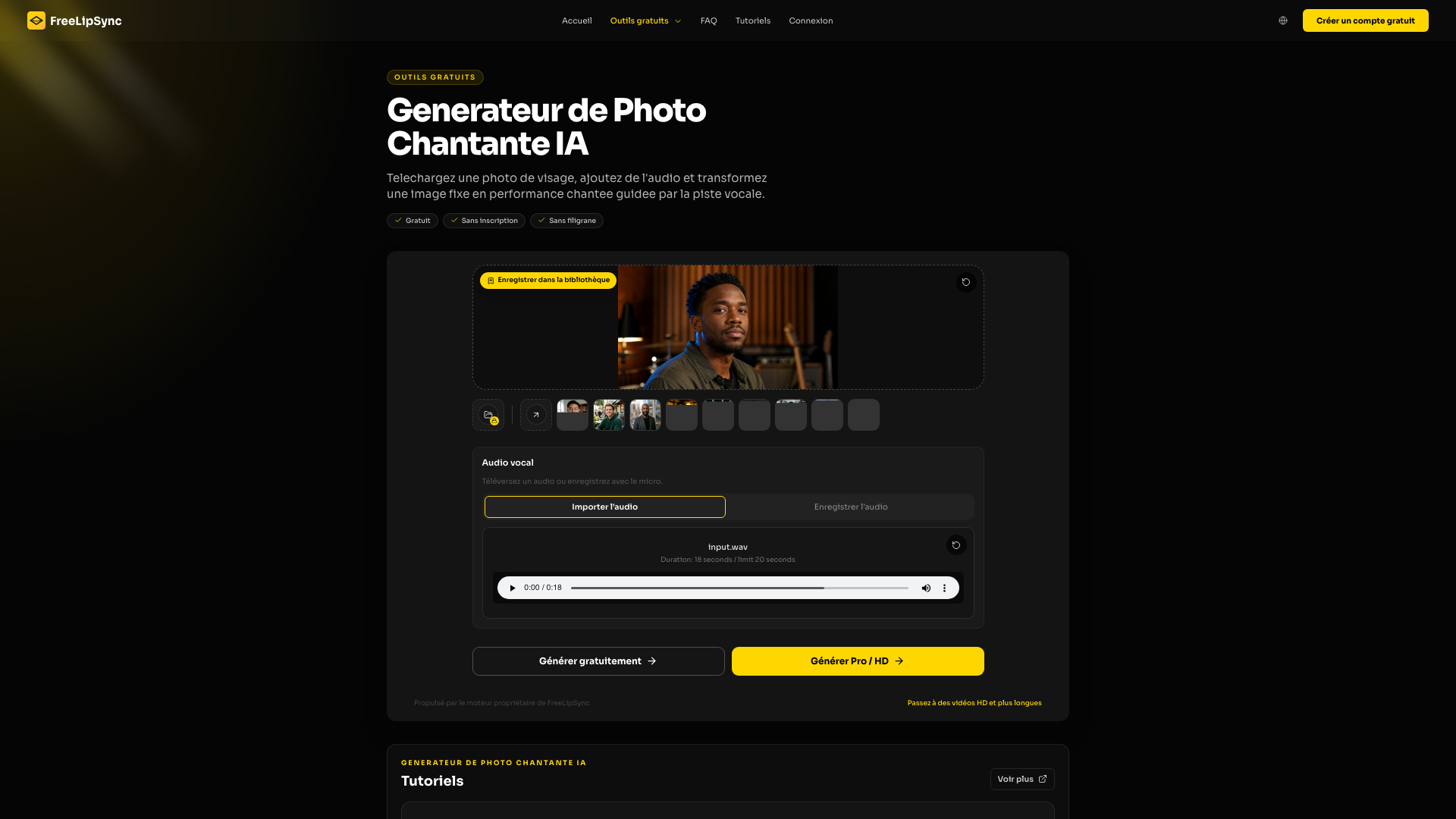
- Choisir la photo — Une image, un visage, bouche et mâchoire dégagées. Un trois-quarts convient ; une main, une tasse ou un micro en travers des lèvres non.
- Ouvrir Faire Chanter une Photo — La page est déjà réglée sur image plus audio avec le modèle de chant, il n'y a rien à configurer.
- Ajouter la chanson — Prenez un extrait dont vous détenez les droits. Dix à vingt secondes contenant une ou deux phrases complètes suffisent pour un premier aperçu.
- Générer une fois — Vérifiez que la bonne photo et le bon audio sont chargés, générez, et conservez le fichier avant toute retouche.
- Le regarder en entier — Jugez le clip complet — calage, notes tenues, et si le visage à la fin est toujours la même personne qu'au début.
Ce qu'il faut regarder dans le résultat
Écoutez les consonnes, les voyelles tenues et les silences entre les phrases. Sur un portrait humain, ce sont généralement les silences qui trahissent : si la bouche continue de bouger pendant une pause de la voix, le modèle suit l'accompagnement plutôt que la voix.
Si quelque chose cloche
- Une phrase décroche ? Gardez la photo, coupez l'audio sur cette seule phrase et ne régénérez qu'elle.
- Le calage est flou du début à la fin ? C'est presque toujours le mixage. Essayez une version du même extrait avec la voix plus en avant avant de changer autre chose.
- Le visage tremble ou perd sa ressemblance ? Recadrez plus large. Donner au modèle plus de tête et de cou stabilise souvent mieux qu'un fichier plus défini.
Ce que ça coûte
Tester ne coûte rien : une génération de 20 secondes ne consomme aucune Pro Video, et une inscription gratuite débloque un téléchargement sans filigrane en résolution réduite. Au-delà, la facturation se fait au résultat fini et non à la seconde : une vidéo en résolution d'origine consomme une Pro Video. Starter inclut 20 Pro Videos tous les 30 jours, un abonnement Pro actif est illimité, et le Creator Pack acheté une seule fois ajoute 5 Pro Videos qui n'expirent jamais.
Voir les offres et leurs tarifs
Questions fréquentes
Le visage doit-il regarder droit vers l'objectif ?
Non. Les angles en trois-quarts fonctionnent et paraissent souvent plus naturels qu'une pose de face. Ce qui compte, c'est que les lèvres et la mâchoire soient visibles et que rien ne les traverse.
Quelle durée pour le premier essai ?
Dix à vingt secondes. Assez pour une phrase complète et une respiration, assez court pour ne pas payer juste pour découvrir que le mixage ne va pas.
La chanson doit-elle être dans la langue de cette page ?
Non. Le lip sync suit le fichier audio, pas la page. Nous avons pris une chanson dans la même langue uniquement pour que la démo se lise bien.
Puis-je utiliser la photo de quelqu'un d'autre ?
Uniquement avec son accord ou une autre base légale. Ce qui est permis varie selon le pays et selon l'endroit où vous publiez, et les plateformes agissent de toute façon sur signalement.
Puis-je utiliser une chanson commerciale ?
Uniquement si elle vous appartient ou si vous disposez d'une licence couvrant le lieu de publication. Une musique originale, commandée, libre de droits ou sous licence de la plateforme évite la question.
Faites-le avec votre propre photo
Chargez votre propre portrait dans Faire Chanter une Photo, ajoutez un extrait dont vous détenez les droits, et générez une fois avant de vous lancer dans plus long.
Dernière mise à jour:


