
A familiar-looking video, a rewritten line, and a voice that still sounds like the original speaker: that is the promise behind LTX's LipDub beta. The announcement shared on May 11, 2026 introduced a text-driven dubbing adapter for existing footage. As of our October 15 review, the official documentation and model listing call it Dub-It. This is a look at that release and its current workflow, rather than a new October launch. Original announcement, current model card.
The practical takeaway: test Dub-It when you want to rewrite a short existing performance through an LTX workflow. Start with FreeLipSync when you want a browser workflow for a supplied voice track, a selected or cloned text-to-speech voice, or a talking photo with action and camera direction. Both can help change spoken content; they give you different kinds of control.
This is a feature and workflow comparison, not a head-to-head quality test. We have not measured which produces more convincing mouths, better voice similarity, or faster renders on matched inputs.
What the LipDub announcement actually introduced
LipDub is an IC-LoRA, an adapter used with the LTX model rather than a standalone video editor. Its launch announcement described a system that generates replacement speech and corresponding mouth movement together from a source video and new dialogue text.
The advertised beta envelope was 1080p output, clips up to eight seconds, one speaker, and five validated languages: English, French, Spanish, German, and Russian. Those are the May launch specifications. The current guide does not repeat a universal eight-second or 1080p ceiling, so do not assume that an arbitrary frame-count setting establishes a newly supported maximum. May 11 release post.
The current adapter is still associated with LTX-2.3. LTX's guide explicitly says LTX-2.5 support is in development and has not yet been validated. A newer base-model download is therefore not automatically a compatible replacement. Dub-It guide.
The important difference: who supplies the final speech?
LTX's own explanation is unusually clear on this point: LipDub takes the replacement words as text. The original video's sound supplies voice conditioning; it is not the new dialogue track. The system synthesizes new audio rather than passing your recording through unchanged. Its intended goal is to retain the speaker and scene while changing the words, with preservation described as an aim rather than a pixel-perfect guarantee. LTX's workflow explanation.
That matters when a voice actor, client, or localization team has already approved an exact take. In that situation, making the video follow the supplied performance is a different job from asking a model to produce a new performance from a script.
FreeLipSync's audio-to-video lip-sync tool accepts a face video plus an uploaded recording or browser-recorded audio. Its text-to-video tool also accepts existing footage, but lets you choose a preset voice or clone a voice from a sample for the replacement script. It would be misleading to describe FreeLipSync as audio-only, or to imply that only LipDub can rewrite an existing video.
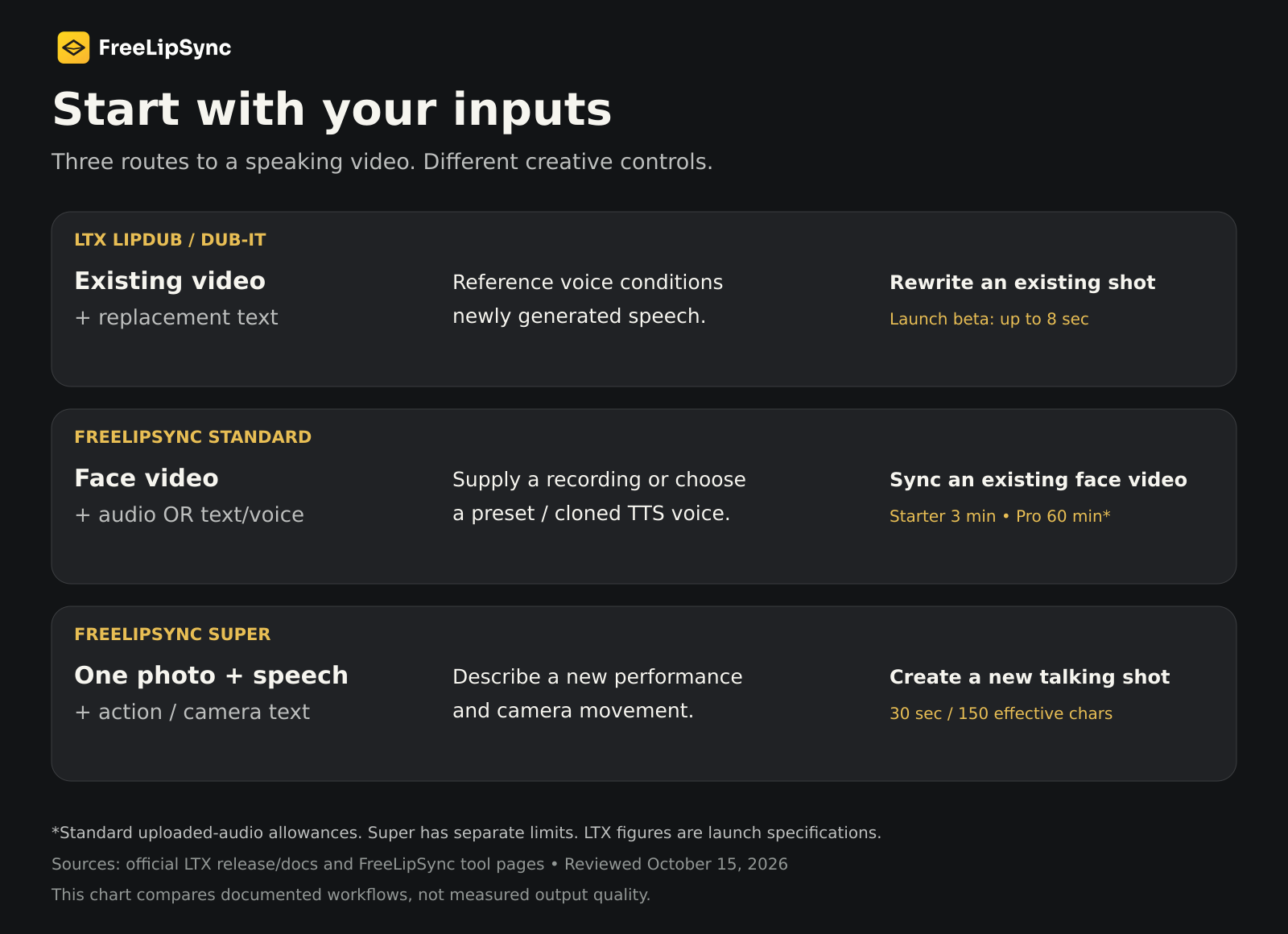
LipDub vs FreeLipSync: a functional comparison
| Decision | LTX LipDub / Dub-It beta | FreeLipSync |
|---|---|---|
| Starting material | Existing video, including reference speech | Existing face video for standard lip sync; a still image for talking-photo workflows |
| Replacement dialogue | Text prompt; new speech generated with the video | Uploaded or recorded audio, or text with a preset/cloned voice |
| Voice control | Conditioned on the source video's voice | Supply the desired take or select the text-to-speech voice |
| Movement goal | Retain the existing shot and performance as much as possible | Standard lip sync follows source footage; Super can generate a new photo-based shot with written action/camera direction |
| Duration | Launch beta advertised up to 8 seconds | Standard uploaded audio: Starter up to 3 minutes, Pro up to 60 minutes; Super: up to 30 seconds |
| Running it | ComfyUI or Python with compatible model assets | Hosted browser tools |
| Access model | Downloadable adapter under the LTX-2 Community License | Hosted product; not an interchangeable downloadable LTX adapter |
Sources: LTX model card, release specifications, FreeLipSync audio inputs and duration, text and voice selection, Super motion control. These limits describe different workflows, not matched output quality.
Keep Super's limits separate from standard lip sync
FreeLipSync's motion-control workflow starts from one image. You add speech and describe the subject's action and camera movement, such as a gesture and a slow push-in. It uses Super and accepts up to 30 seconds of audio or 150 effective script characters. Script duration depends on delivery and pauses.
That is useful when the desired shot does not exist yet. It is not the same operation as preserving an existing filmed performance while changing its dialogue. The standard Pro 60-minute allowance does not extend Super to 60 minutes.
What to check before trying Dub-It
The official Dub-It guide supplies both ComfyUI and Python paths. The documented ComfyUI pipeline generates at lower resolution, upscales the video latent, and refines at higher resolution. The launch's joint audio/video description should not be read as a claim that the current graph has only one sampling stage.
The guide also gives practical constraints:
- Supply the actual translated or replacement words. It does not translate for you.
- Keep one speaker in the shot; the beta does not separate multiple speakers.
- Write dialogue in its native script and keep its timing close to the original. Overlong text can lose words, while very short text can produce unnatural pacing.
- The five validated languages remain English, French, Spanish, German, and Russian. A prompting example or accepted input is not evidence that another language has been validated.
For sound finishing, keep separate music, ambience, and effects stems. LTX warns that the original audio is regenerated, so exact preservation of those elements requires remixing them in post. LTX audio guidance.
Hardware: check the version, not just a VRAM headline
Self-hosting means managing the base checkpoint, adapter, upscaler, text encoder, and an appropriate runtime. Follow the versions in the linked workflow instead of mixing files because their names look similar. Official ComfyUI workflow.
LTX's general system-requirements page currently specifies LTX-2.5, while Dub-It is validated on 2.3. We are therefore not presenting that page's hardware figures as a verified Dub-It minimum. Memory needs and render time should be checked against the actual workflow, resolution, duration, and quantization you intend to use. FreeLipSync's hosted tools avoid a local model installation.
“Open source” still comes with license conditions
The release uses the phrase open source, but the model card points to the LTX-2 Community License. The published license contains usage and redistribution conditions and requires a paid commercial-use license for entities with annual revenues of at least $10 million, with the defined entity scope including related companies. Downloadable weights should not be interpreted as unrestricted commercial permission. Review the actual license for your deployment; this summary is not legal advice.
Which workflow fits your next video?
You have a finished short scene and need a new line. Dub-It is worth testing if you want its source-conditioned speech and can work within an LTX setup. FreeLipSync's text workflow is another route when explicit preset or cloned-voice selection matters.
You already have an approved voiceover. Start with audio-to-video lip sync. The supplied recording is the creative anchor. Check the resulting timing, pronunciation, and final mix before delivery.
You have a portrait and want a new performance. Use motion-control lip sync to explore a spoken shot with action and camera instructions. Plan within Super's own limits.
You need a multilingual version. Review the translated script first, then test a short representative passage. Ask a fluent speaker to check meaning and pronunciation, and verify that the performance still fits the intended message. Obtain permission to use the person's likeness and voice.
The strongest reason to watch LipDub is its joint speech-and-mouth generation approach to revising existing footage. The strongest reason to choose a particular tool today is simpler: it should accept the assets you already have and give you control over the parts you cannot afford to change.
Sources and review scope
Reviewed October 15, 2026. The release post is dated May 11, 2026; LTX's explanatory article is dated May 20, 2026. The current documentation was checked on the review date; no publication or last-update date is asserted for that guide.
- LipDub beta release announcement
- Current Dub-It documentation
- Official adapter model card
- LTX: Lipsync vs. LipDub
- Official two-stage ComfyUI workflow
- LTX-2 Community License
- FreeLipSync audio-to-video, text-to-video, and motion control
This comparison reports documented functionality. It does not claim a measured quality, speed, or voice-preservation winner.