
BytePlus announced OmniHuman 2.0 on October 15, 2026, with two changes creators can put numbers on: continuous videos of up to five minutes and a published price of $0.07 per second. The announcement compares those figures with a previous 60-second limit and $0.12 per second. Read the announcement.
For regular talking-photo and face-video work, FreeLipSync still has a strong cost advantage. A month of twenty one-minute standard lip-sync outputs costs $9.90 on Starter, versus $84 at OmniHuman's advertised rate: 88.2% less spending for that workload. That is a subscription-versus-API budget comparison, not a claim of equivalent output quality. Current FreeLipSync pricing.
The useful question is how much you will actually produce, and whether you need OmniHuman's broader performance controls. Here is the launch news alongside the same practical cost-per-second approach used in our second-half AI video pricing report, recalculated with prices checked on October 15.
What BytePlus announced
The new model starts with a single image and audio, with an optional text prompt. BytePlus lists native 720p output, multi-person performances, and text-based control of gestures, actions, and camera movement. Its emphasis is on movement that follows the rhythm and meaning of the audio, including emotional delivery and singing. These are the capabilities BytePlus advertises on its OmniHuman product page.
We have not run an independent quality benchmark for this article. Descriptions such as better motion or emotional understanding are the provider's positioning, rather than a measured result from FreeLipSync.
The advertised rate and the monthly bill
OmniHuman's $0.07-per-second rate works out to $4.20 for one minute and $21 for five minutes. Moving from $0.12 to $0.07 is a 41.7% rate reduction: ($0.12 − $0.07) ÷ $0.12.
FreeLipSync uses a different billing unit. Its monthly plans list Starter at $9.90 with 20 Pro Videos per month and up to three minutes per video. Pro is $69.90 with unlimited Pro Videos and up to 60 minutes for standard lip sync; Music Video has a separate six-minute limit. Both paid tiers include high-resolution downloads without a watermark. The FAQ defines a Pro Video as original-resolution output and confirms Starter's allocation every 30 days.
Here are the actual spending scenarios. FreeLipSync columns charge the whole monthly subscription even when only one result is made.
| Workload in one month | FreeLipSync monthly plan | FreeLipSync spend | OmniHuman at $0.07/sec |
|---|---|---|---|
| One 1-minute output | Starter | $9.90 | $4.20 |
| Twenty 1-minute outputs | Starter | $9.90 | $84.00 |
| Twenty 3-minute outputs | Starter | $9.90 | $252.00 |
| One continuous 5-minute output | Pro | $69.90 | $21.00 |
| Twenty 5-minute outputs | Pro | $69.90 | $420.00 |
These are standard lip-sync workload comparisons using uploaded audio and one usable generation per output. They compare purchasing options for different products, not matched-resolution or matched-quality results. All figures are USD before tax, without annual discounts, add-ons, or extra attempts. OmniHuman totals assume its advertised rate applies throughout the requested duration. Confirm account-specific billing before running jobs.
The twenty-by-three-minute row is a theoretical full-utilization case: every included Starter result must reach the three-minute maximum. Starter cannot make a continuous five-minute output, so the five-minute rows use Pro. The separate Motion Control workflow uses Super and is capped at 30 seconds; the long-form examples above do not apply to it.
Where FreeLipSync saves the most
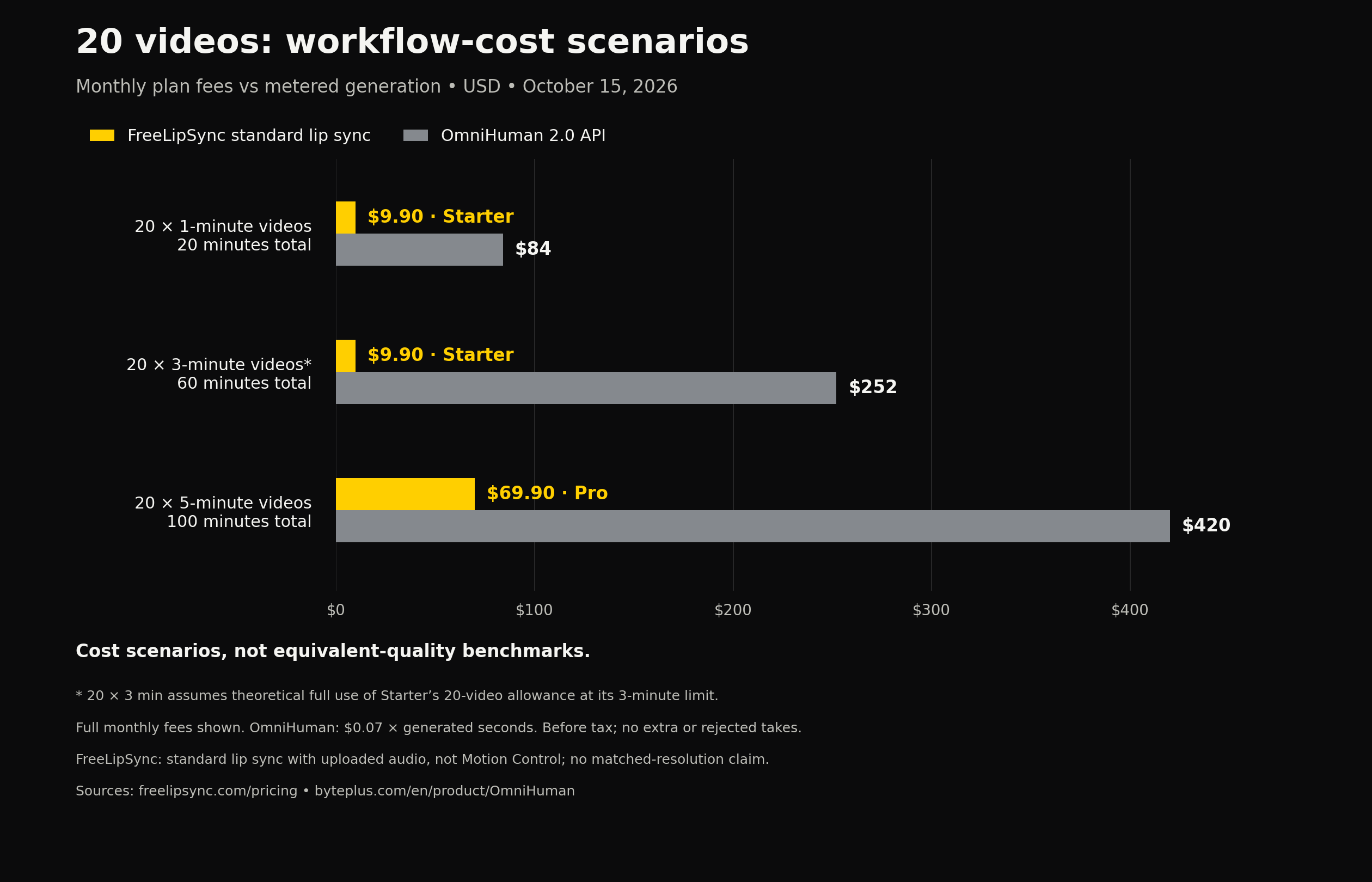
Twenty-video monthly workload costs. Full monthly subscriptions; uploaded-audio standard lip sync; no extra attempts; different workflows, not equivalent quality.
For a creator making twenty one-minute talking clips, Starter allocates $9.90 across 1,200 output seconds. That is $0.00825 per second, or $0.495 per minute. The monthly saving against the $84 OmniHuman illustration is $74.10, or 88.2%.
This is where counted-video billing becomes useful: a longer standard clip does not turn into a larger per-second line item within the included duration limit. Using the same average-length scenarios as the pricing report:
| Average length across 20 Starter outputs | Total output | Effective cost per second | Effective cost per minute |
|---|---|---|---|
| 30 seconds | 10 minutes | $0.01650 | $0.990 |
| 60 seconds | 20 minutes | $0.00825 | $0.495 |
| 180 seconds | 60 minutes | $0.00275 | $0.165 |
The last row is a theoretical floor, not a typical customer result. Formula: $9.90 ÷ (20 × average output seconds). With unused allowance or rejected takes, the effective price of each usable minute rises. None of these figures is an a-la-carte purchase price: making only one minute during the month still means paying $9.90.
For ongoing longer work, twenty five-minute standard lip-sync outputs would allocate Pro's $69.90 across 100 minutes: $0.699 per minute, versus $4.20 at OmniHuman's announced rate. That is an illustrated monthly difference of $350.10, or 83.4%. An unlimited entitlement has a fixed subscription cost; it does not make the effective cost zero, promise unlimited throughput, or guarantee that every attempt is usable.
At low volume, pay-per-second can cost less. The single-output rows make that trade-off visible. For regular publishing, FreeLipSync's fixed bill can leave considerably more budget for scripting, voice work, and editing.
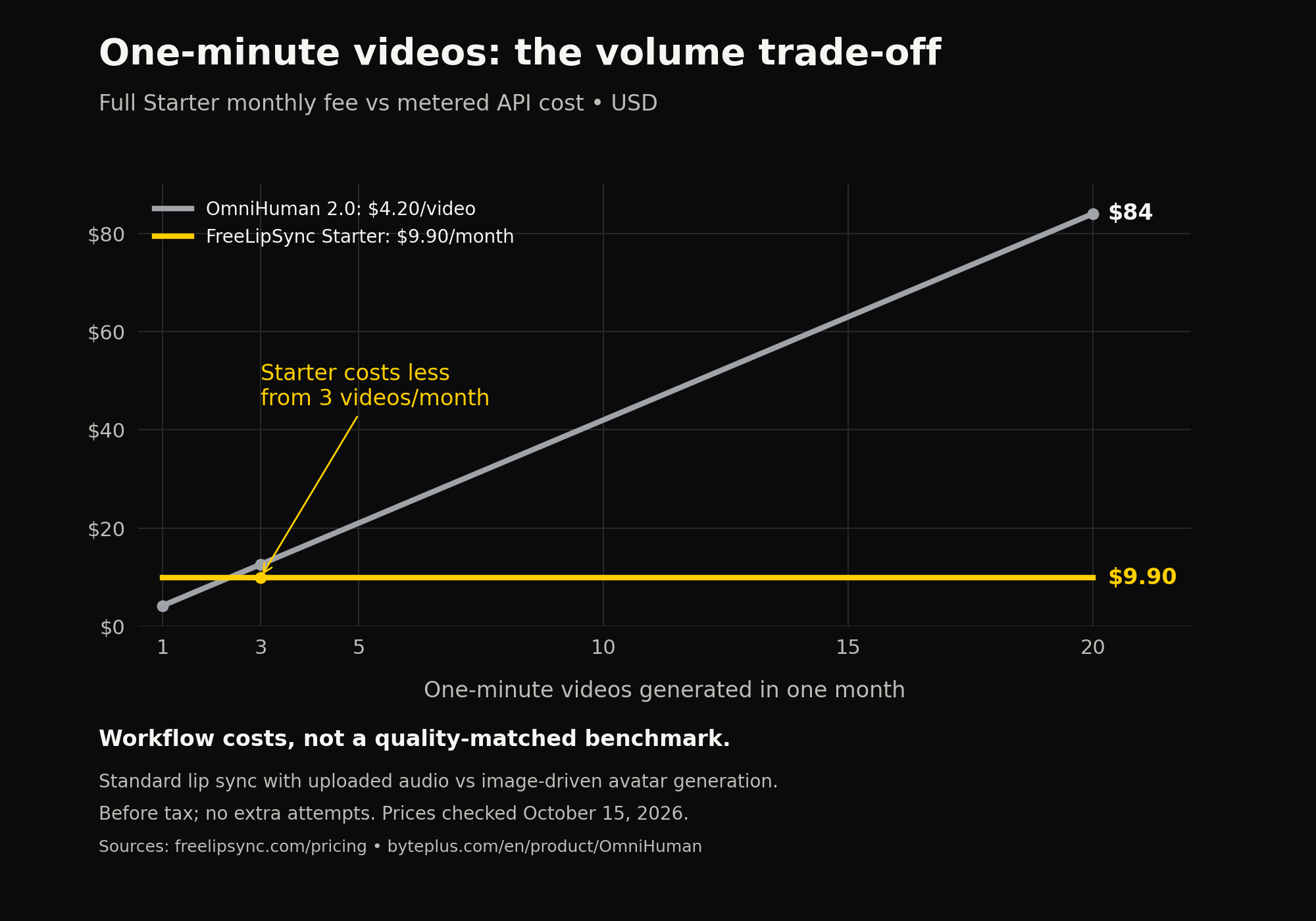
One-minute output volume: Starter costs the full $9.90 monthly fee; OmniHuman is $4.20 per output. First lower-spend whole output count is three. No extra attempts; standard lip sync and avatar generation are different workflows.
Compare the workflow as well as the price
OmniHuman advertises native 720p and performance control from image, audio, and text. FreeLipSync's plan page promises high-resolution downloads, and its FAQ describes original-resolution output. Original resolution means the resolution of the generated output; it does not promise to preserve the input's pixel dimensions or guarantee 1080p or 4K. These descriptions do not establish identical resolution or quality across the two services.
The FreeLipSync examples here cover standard lip sync with uploaded audio. Text-to-speech has its own script caps: Starter lists 800 characters, which should not be treated as a guarantee of a three-minute spoken script. The listed web subscriptions are also not API price quotes; FreeLipSync lists API access under custom Enterprise pricing.
If a creative change leads to additional billed generations, include them in the budget. For example, twenty one-minute OmniHuman outputs with three billed attempts each would total $252. On Starter, twenty included Pro Video generations should not be budgeted as twenty final keepers plus unlimited extra Pro Video attempts. We have not verified a complete failed-job or refund policy for both products, so these examples do not assume all technical failures are charged or all retries are free.
Why a five minute shot changes the planning
A longer continuous take could be useful for a lesson introduction, a product explanation, or a full song performance. It gives creators a way to try a sustained delivery without planning several separate generations and their joins.
That does not mean every project should use the longest available setting. A short test is easier to inspect. Pick a section that includes the difficult parts of your script: a quick phrase, a pause, an emotional change, or a stretch of singing. Check that before committing to the full piece.
For a longer result, review more than the opening seconds. Look for changes in the face, costume, hands, background, and framing as the clip continues. Listen for whether visible mouth closures line up with the voice. Check whether gestures support the words or distract from them. A long duration is valuable only if the section you need remains usable.
Choose the workflow around your source material
If you have a portrait and want a new performance, an image-driven avatar model is a relevant place to start. OmniHuman 2.0's advertised combination of audio and optional text direction makes it worth evaluating when gesture and camera behavior are part of the brief.
For a straightforward speaking portrait, FreeLipSync's AI Talking Photo Generator provides a dedicated photo-to-speech workflow. If the project centers on a vocal track, Make Photo Sing is a more specific starting point.
If you already have a face video and need different speech, start from that requirement. The Audio to Video Lip Sync tool accepts existing face footage and a replacement audio track. For another language, the AI Video Dubbing tool works with translated text or prepared dubbed audio. You still need a reviewed translation; that page does not promise automatic translation of the source.
Choose the tool around the source material and the controls you need, then compare costs at your expected monthly volume.
What to check before a production job
The linked OmniHuman 2.0 API document did not expose a readable specification body when we checked on October 15. That leaves practical questions to verify before integration:
- Which input formats, file sizes, and audio lengths does the current endpoint accept?
- What output settings and account or regional restrictions apply?
- How are failed jobs, retries, and fractional seconds billed?
- What are the queue, concurrency, and processing-time expectations?
- What permissions and usage terms apply to the image, voice, and music?
The marketing page also uses the duration wording “30s to 300s,” while the announcement describes an increase from 60 seconds to five minutes. Neither wording is enough to infer a minimum billable duration or every supported API setting.
Use images, voices, scripts, and music you own or have permission to use. Review the whole result before publishing, and disclose synthetic or altered performances when viewers could otherwise mistake them for an authentic recording.
The takeaway
OmniHuman 2.0's longer takes and lower advertised rate are worth evaluating for image-driven performance. For frequent standard talking-photo, dubbing, and face-video lip-sync work, FreeLipSync's current subscription math remains compelling: twenty one-minute outputs fit Starter's $9.90 monthly allowance, compared with $84 at OmniHuman's announced rate.
Start with a short test of the hardest line in your script. If a focused lip-sync workflow meets the brief, compare FreeLipSync's current plans before paying for every generated second. If your project needs OmniHuman's specific performance controls, evaluate those on your own material before scaling up.
Sources
Checked October 15, 2026. This article reports the launch announcement and public product information; it is not a hands-on benchmark.
- FreeLipSync current pricing and public FAQ, checked October 15, 2026, for plan prices, allowances, and output definitions.
- Second-half pricing report and cost-per-second comparison, for calculation structure; this article uses newly checked prices rather than their historical price snapshots.
- FreeLipSync Motion Control, for the separate 30-second limit.
- BytePlus launch announcement on X, posted October 15, 2026 at 08:05 UTC.
- OmniHuman 2.0 product page, including the advertised rate and input workflow.
- OmniHuman 2.0 API document, linked for future specification checks; no readable API body was available at review time.