If you need a song for a video but do not have one ready to upload, FreeLipSync AI Music Generator can create new audio from a style description and your lyrics. This is an AI song generator with lyrics: you supply the words and musical direction, then review what the tool actually sings. You can use an approved vocal result in a singing-photo or music-video workflow. Song creation and lip-sync video creation are two separate steps.
Why start with lyrics and purpose?
A birthday message may need the recipient's name and a chorus friends can recognize. A mascot campaign may need a short branded phrase and a consistent mood. A creator intro may need a musical identity before a visual is chosen. These scenarios are different from uploading an existing licensed song: the words and mood are part of the creative brief from the start.
A short event invitation can put the date or theme into a memorable refrain. A lesson recap can repeat one concept as a chorus when the audience is meant to remember it. A character video can give a fictional singer a song written for that character rather than a generic backing track. For each scenario, decide whether the words need to be understood precisely or whether mood matters more. That decision changes how simple the lyric should be and what you listen for in the output.
Write the first version for clarity, not length. A concise verse and chorus make it easier to judge whether the generated song delivers the intended message. If the track is for a singing image, choose vocal lyrics; an instrumental cannot supply mouth movements for sung words.
How to create the song
- Define the use case. Decide who will hear the song, what line matters most, and whether the result will be audio-only or a later lip-sync video.
- Describe the style. State a genre, mood, instruments, tempo, and desired vocal feel. Be concrete without claiming the tool will copy a particular artist's voice or recording.
- Add your lyrics. Separate a short verse and chorus with the editor's
[Verse]and[Chorus]labels. If you want instrumental music instead, choose the Instrumental option and leave out vocal lyrics. - Set a maximum length and generate. The editor accepts 10–300 seconds as an upper bound, not an exact promise. Listen to the full result; the song may conclude before the maximum.
- Review the handoff. Check the words, melody, vocal clarity, and ending. Then use the available action to make a photo sing or create a music video, or download the audio if available to your account.
From lyric draft to a usable video soundtrack
Start with the one line that must survive generation: a name, message, or hook. Place it in a short chorus and keep the surrounding verse simple enough to hear on the first listen. In the style prompt, describe musical qualities such as tempo, instruments, mood, and vocal character rather than asking to reproduce a named artist or song. Generate the audio, then compare the sung words with your lyric draft. If an essential line is unclear, revise the lyric or style and make another take before planning visuals.
For a singing photo, choose the vocal take you actually want the face to perform. For an AI music video, choose the approved song or excerpt before asking for visual shots. An AI music generator supplies audio; it does not guarantee rights to imitate a performer, exact pronunciation, or an exact duration. Confirm the terms and permissions for the finished track before public or commercial use.
Example: an original FreeLipSync-themed vocal song
For a short creator intro, we used a concise verse and chorus with an uplifting indie-pop style direction: a warm female lead, bright piano, muted guitar, soft bass, restrained drums, and a clear vocal mix. The lyrics were written for this example, including the chorus hook “FreeLipSync, let the picture sing.” The style prompt describes musical qualities rather than naming an existing artist or recording.
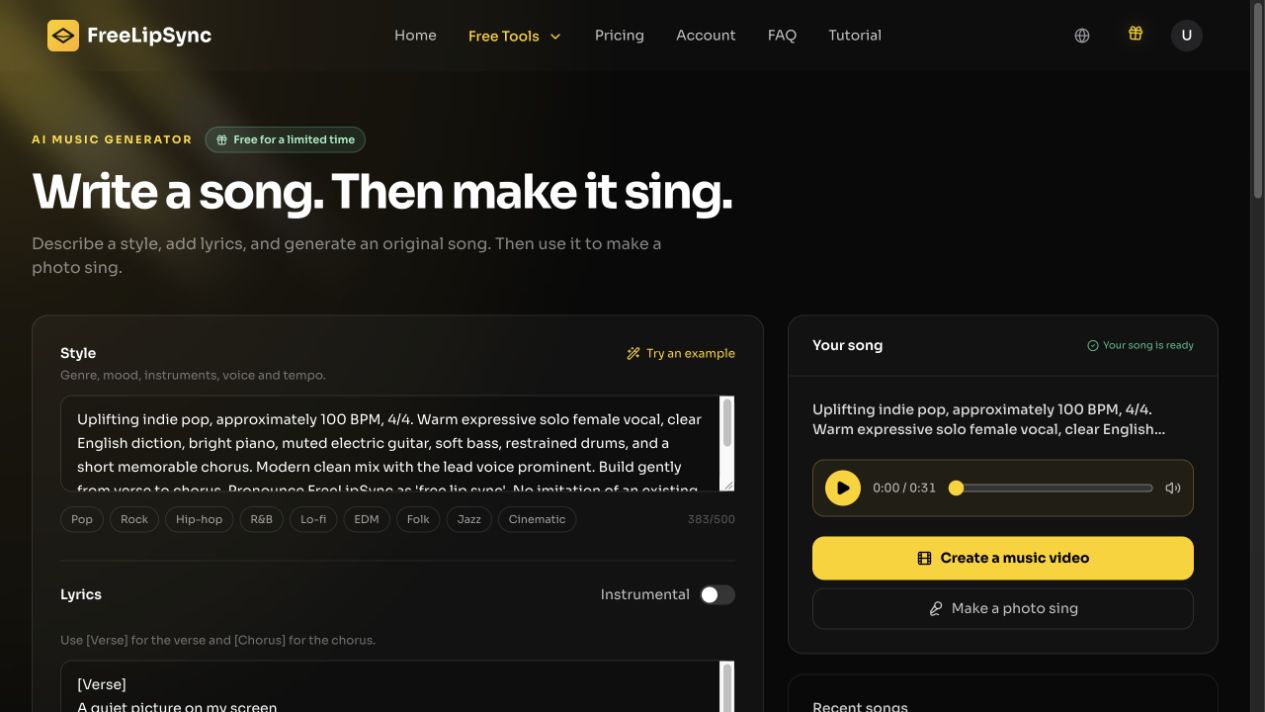
The screenshot records the style-and-lyric workflow. It does not establish a byte-for-byte identity between the in-product record and the supplied approved audio file below.
The approved generation, New Light, is available here as the actual audio asset. Its running time is about 31 seconds. The editor's duration setting is a ceiling, so plan the video from the finished file rather than assuming a requested maximum will be met exactly.
The supplied approved audio is used for the one-photo AI music video example. Retain that file with the video project so a later revision is not mistaken for the input.
Use the song in video without losing the source
Save the approved audio and lyric version together. If you later generate a singing photo or AI music video, compare that video with this exact song rather than a later revision. For an instrumental track, use it as background music elsewhere; it has no vocal performance to lip-sync.
Frequently asked questions
Do I need a pre-existing song?
No. The tool creates audio from the style description and your lyrics.
Can it make instrumental music?
Yes. Choose Instrumental, but do not expect a singing mouth performance from audio with no vocals.
Will it make an exact-length song?
No. The requested duration is a ceiling, and the song can end sooner.